


Kitcha: Recipe & Meal Planner
4.748.00 Reviews
App Specs
- Version
- 1.11.0
- Updated On
- License
- Free
- Downloads
- 10,000+
- Developer
- FireKamp
- Categories
- Food & Drink
- Platform
- Android
Screenshots
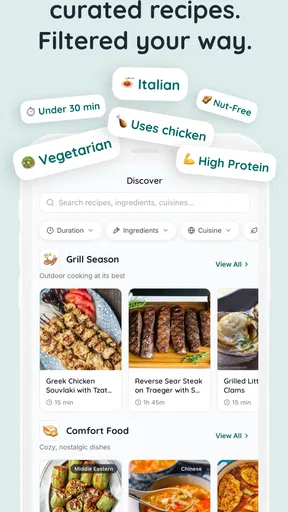
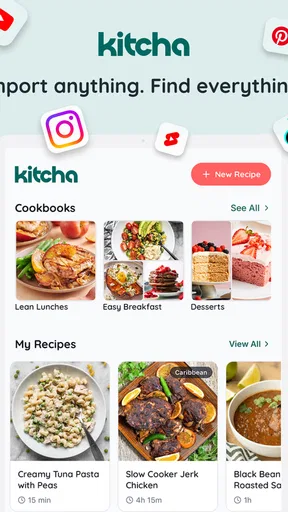
 Analysis by AppCompare
I usually discover recipes in the least organized way possible: a link sent by a friend, a page opened during a quick search, or a recipe I save with the intention of returning to it later. The problem is rarely finding food ideas. It is turning those scattered ideas into a meal plan that fits real life, then remembering what I need to buy. Kitcha: Recipe & Meal Planner, developed by FireKamp, is built around that exact transition from inspiration to an organized kitchen routine.
After spending time with this free Food & Drink app, I found its appeal less in any single flashy tool and more in the way its parts connect. It brings recipe saving, planning, shopping preparation, and nutrition tracking into one place. That makes it especially interesting for someone who is tired of keeping recipes in browser tabs while maintaining a separate notes app for groceries and another method for checking meals.
The app is rated for Everyone and runs on Android devices using version 7.0 or newer. Its current version is 1.11.0, and it has passed the ten-thousand-install mark with a 4.7 average from around 850 ratings. Those figures suggest a healthy early audience, although I would still describe Kitcha as a focused tool rather than a universal replacement for every cooking or health app.
From a saved link to a workable week
I find that saving a recipe is only useful if I can picture when I’ll actually cook it. This section looks at how I’d move from a promising link to a plan that fits the week, including the small choices that keep a collection practical rather than overwhelming. From there, I’ll consider how the app holds up when several planning tasks come together.
The starting condition: recipes are easy to collect and hard to use
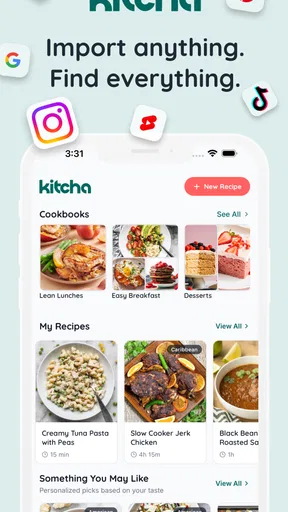
The first useful question is not “Does Kitcha have recipes?” It is “What happens to the recipes I already find elsewhere?” The central idea here is saving recipes from any website, which changes the starting point. I do not have to abandon the sites I already trust or search only within a closed recipe catalog. I can begin with the pages that already match my taste, dietary preferences, or cooking skill.
That matters because recipe discovery and meal planning are different activities. A website may be excellent for showing an attractive dinner but poor at helping me decide what to eat on Thursday, what ingredients overlap between meals, or whether I am repeating the same type of dish too often. Kitcha is most useful in the gap between those moments.
My practical advice is to save recipes with a purpose instead of importing everything that looks appealing. A small collection of meals I would genuinely cook is more useful than a large archive of aspirational dishes. This is one of the first non-obvious trade-offs: the app can reduce clutter in my cooking routine, but only if I do not recreate the same clutter inside it.
Worth Reading Before You Choose

EA SPORTS FC Mobile 26 Is a Bigger Football Game, but It Takes Time

Flipboard Shows What News Apps Must Do Beyond the Feed

Switching to Android Auto Means Rethinking Your Driving Routine

Google Calendar Makes a Crowded Week Easier to Manage

Ludo King Makes the Most of the Minutes Between Plans

Baby Panda World Brings Quick Play to Modern Phones, but Its Game Library Feels Busy
Step one: capture recipes without changing the way I search
The saving workflow is the app’s natural entry point. I can look for a recipe on the web as usual, then bring that recipe into Kitcha rather than leaving it stranded in a browser bookmark. For me, this is more practical than manually copying ingredients into a note because the saved item remains connected to the planning process.
This also makes the app suitable for different kinds of cooks. Someone who follows a few favorite food sites can build a personal library over time. A beginner can save dependable recipes for busy evenings. A more experienced cook can collect ideas by season or cooking method and decide later which ones deserve a place in the week.
There is a small discipline involved. Saving a recipe is not the same as checking whether it suits my household. Before I plan it, I would look at preparation demands, ingredients I already have, and whether the meal produces useful leftovers. Kitcha helps organize the decision, but it does not remove the decision. That is a strength in terms of flexibility, though users looking for an entirely automatic menu may find the process more hands-on than expected.
Step two: turn a collection into a meal plan
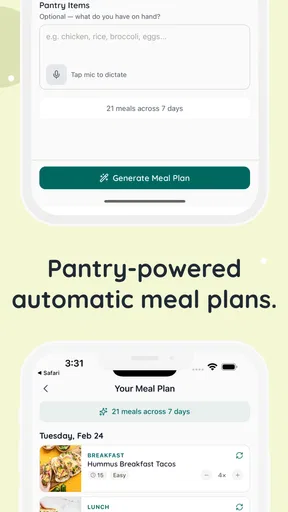
Once recipes are gathered, the meal planner gives them a destination. Instead of treating saved recipes as a passive library, I can place them into the shape of an actual week. This is where the app starts to feel different from a normal recipe bookmark system.
I found it helpful to plan around constraints rather than around enthusiasm. For example, I might choose a quicker meal for a workday, a recipe that uses more time when I know I will be home, and a flexible option for a night when plans could change. The planner becomes more valuable when it reflects my schedule instead of simply displaying the meals I like most.
A useful workflow is to place recipes with shared ingredients near one another. If two meals use the same herbs, vegetables, or staple items, planning them within the same period can reduce waste. This is not just a convenience feature; it changes how I select recipes. I start evaluating a dish as part of a sequence rather than as an isolated plate.
Another practical tip is to leave room for leftovers. A meal planner can become unrealistic when every day contains a brand-new recipe. I would plan fewer distinct cooking sessions and allow one dish to support another meal. That makes the resulting grocery list more believable and lowers the chance that an ambitious plan collapses by the middle of the week.
Step three: move from the plan to the grocery list
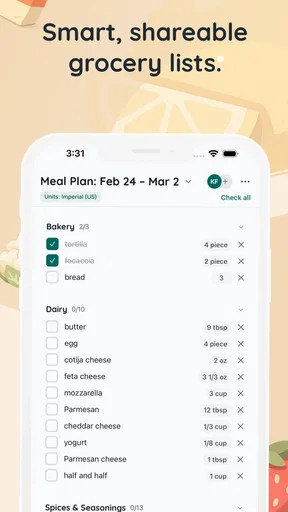
The handoff from meal planning to shopping is where many food apps lose their usefulness. A plan may look tidy, but if I still have to rewrite every ingredient into a separate list, the organizational benefit is limited. Kitcha includes a grocery-list workflow, so the meals can lead into the shopping stage instead of ending at the calendar.
This is the part I would use before visiting a supermarket, not while wandering through one without preparation. I would review the generated list, remove items already in the cupboard, and check quantities against the recipes I actually intend to cook. That review matters because a grocery list is only as reliable as the plan behind it.
The most useful handoff is the reduction of mental switching. I do not need to remember which recipe called for a particular ingredient or keep jumping between several pages. The list gives the week a practical shopping outline. It also reveals conflicts early: if the plan requires too many specialty ingredients or duplicates something I already own, I can adjust before spending money.
Still, I would not treat the list as an unquestionable shopping order. Pantry staples, package sizes, substitutions, and household preferences often require judgment. If I cook for several people or change serving sizes regularly, I would inspect the list carefully before checkout. Kitcha can organize the information, but my kitchen remains the final authority.
Step four: use nutrition tracking as a feedback loop
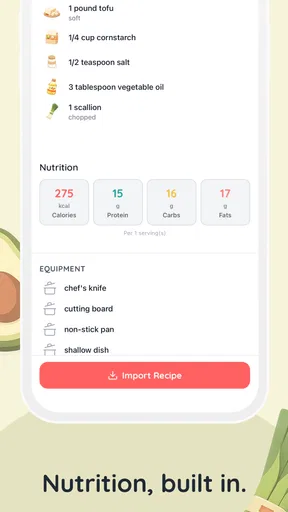
Nutrition tracking adds another layer to the workflow. It gives the meal plan a way to be evaluated after I choose the recipes, rather than leaving nutrition as an afterthought. For someone trying to understand patterns across meals, this can make planning feel more deliberate.
I see this feature as most useful for comparison, not as a reason to chase perfect numbers. I might compare a week built around rich comfort food with one that includes more varied meals, then decide what balance feels sustainable. The value is in noticing habits and making informed adjustments, not in turning every dinner into a mathematical exercise.
This is also where I would keep expectations realistic. Nutrition information can depend on ingredients, portions, brands, and substitutions. I would use the tracker as guidance for planning and awareness, especially when comparing meals, while avoiding the assumption that an app can replace professional advice for a medical condition or a clinically prescribed diet.
The everyday scenario: a busy week with limited attention
Imagine I am preparing for a week in which I have little energy for daily decisions. On one evening, I save several recipes from websites I already use. I then choose a handful that match my schedule, placing a quicker option on a demanding day and a more involved meal on a day when I expect to have time. I arrange the plan so ingredients overlap where practical, then move from the plan to the grocery list.
Before shopping, I remove pantry items and reconsider anything that seems unrealistic. After cooking, I use the nutrition side of the app to review the meals as a group rather than judging one dinner in isolation. The outcome is not a restaurant-style schedule; it is a clearer chain from “this looks good” to “I know what I am buying and when I might cook it.”
That chain is Kitcha’s strongest idea. Each stage hands something to the next stage: a website becomes a saved recipe, the saved recipe becomes a planned meal, the planned meal informs the grocery list, and the finished plan can be viewed through nutrition information. The app earns its place when I use that whole sequence.
Where the workflow breaks
The same connected workflow can expose friction. If I save recipes impulsively, the library may become difficult to manage. If I plan too many meals, the grocery list may reflect an ideal week rather than my actual energy. If I fail to check ingredients against what I already own, the list can encourage unnecessary purchases. None of these problems is unique to Kitcha, but the app does not magically solve the human tendency to over-plan.
The website-saving approach also depends on the quality and structure of the source recipe. A beautifully presented page is not always a clean cooking reference. Instructions may be vague, ingredients may need interpretation, and substitutions may not fit neatly into a planned list. I would keep the original recipe page available when cooking something unfamiliar, particularly for techniques where context matters.
Nutrition tracking can create a different kind of friction. Users who want broad awareness may appreciate it, while someone who finds food logging stressful may prefer to focus only on recipes and shopping. Kitcha is therefore not automatically better when every feature is used at once. I would start with saving and planning, then add grocery and nutrition tools only if they make my routine easier.
How it compares with ordinary alternatives
The usual alternative is a mixture of browser bookmarks, screenshots, handwritten notes, and a shopping-list app. That approach is flexible and costs nothing, but it separates the stages. I may save a recipe in one place, plan meals in my head, and write ingredients somewhere else. The weakness is not any individual tool; it is the repeated handoff between them.
A dedicated recipe website may offer stronger discovery, while a standalone grocery app may be faster for simple shopping. A nutrition-focused app may go deeper for people whose main goal is detailed dietary monitoring. Kitcha makes more sense when I want one food-planning path connecting these jobs, even if I do not need the deepest possible version of each one.
I would recommend it to people who collect recipes online, want more structure around weekly meals, or regularly forget to turn saved ideas into a shopping plan. It is also a good fit for households trying to reduce decision fatigue and make better use of overlapping ingredients.
I would be more cautious if I only need a basic checklist, already have a meal system that works, or want highly specialized nutrition guidance. In those cases, a simpler notes tool or a purpose-built health app may be a better match. Kitcha’s value comes from the connection between tasks, so paying attention to only one small part of it may not justify adding another app to the phone.
Cost, access, and who should try it
Kitcha is free to install, with optional in-app purchases ranging from a few dollars to several dozen dollars per item. That makes it easy to test the core experience before deciding whether the broader workflow earns a place in my routine. I would begin by saving a modest group of recipes and planning one realistic stretch of meals rather than importing my entire cooking history.
The Everyone age rating also makes it suitable for general household use, although the usefulness will depend more on cooking habits than age. The Android compatibility reaching back to version 7.0 is helpful for people using older devices, while the current 1.11.0 release indicates that the app is being maintained as an active product.
One of my favorite ways to approach it is as a weekly reset tool. I would spend a short planning session choosing meals, checking the grocery handoff, and looking at the nutritional shape of the week. Then I would stop interacting with the app and cook. The goal is not to live inside a planner; it is to make the next few meals easier.
My final take after following the complete flow
Kitcha: Recipe & Meal Planner is at its best when I follow the entire path from an online recipe to a realistic meal, a checked shopping list, and a useful nutrition overview. It is not merely a place to store food links. Its real advantage is reducing the gaps between discovery, planning, shopping, and reflection.
I would recommend it to a friend who has plenty of recipes but no dependable system for using them. I would also explain that the app rewards moderation: save selectively, plan around real energy levels, inspect the grocery list, and treat nutrition information as a guide. Used that way, it can turn a messy collection of food ideas into a practical weekly routine.
It is not the right choice for everyone. People who want a bare-bones list, a highly specialized diet tool, or completely automatic meal decisions may prefer something else. But for anyone who wants their existing web discoveries to lead naturally into meal planning and shopping, FireKamp has created a focused Food & Drink app with a genuinely useful workflow. The strongest result is simple: fewer disconnected notes and a clearer answer to what I am cooking next.
Pros
- Personalized meal planning helps organize weekly cooking routines.
- Recipe suggestions can make it easier to use available ingredients.
- Useful for discovering new dishes beyond your usual cooking habits.
- Shopping guidance may reduce forgotten ingredients during grocery trips.
- Suitable for users who want more structure in their home cooking.
Cons
- Some useful features may require a subscription or in-app purchase.
- Recipe variety and regional options may differ by location.
- Meal plans may need manual adjustments for allergies or strict diets.
- Ingredient quantities may not always suit every household size.
- Requires regular input to keep preferences and plans accurate.
FAQs for Kitcha: Recipe & Meal Planner
What is Kitcha: Recipe & Meal Planner, and what can I use it for?
Kitcha: Recipe & Meal Planner is designed to help organize everyday cooking by bringing recipes, meal planning, and food preparation into one app. You can use it to discover meal ideas, arrange dishes for upcoming days, and make cooking feel less improvised. It may be especially useful for busy households, beginners, or anyone who wants a clearer plan before shopping and preparing meals.
Does Kitcha create personalized meal plans based on my preferences?
Kitcha may help you build a meal plan around your tastes, cooking habits, and the type of meals you want to prepare. However, the level of personalization can depend on the app version and the information you provide. Before relying on a plan, check each recipe’s ingredients, preparation time, serving size, and suitability for dietary needs such as vegetarian, vegan, allergy-free, or low-calorie eating.
Can Kitcha help me create a grocery shopping list?
One of the most practical reasons to use a meal-planning app is reducing the effort involved in preparing a shopping list. Kitcha can help connect planned recipes with the ingredients required for them, making it easier to see what needs to be purchased. Still, you should review the list carefully because pantry items, ingredient substitutions, package sizes, and quantities may not always match what you already have at home.
Are the recipes in Kitcha suitable for beginners?
Kitcha can be useful for beginners because having organized recipes and a weekly plan removes much of the uncertainty around deciding what to cook. Even so, difficulty varies from one dish to another. New cooks should pay attention to preparation steps, cooking times, equipment requirements, and serving measurements. It is also wise to confirm that you have the necessary tools before starting a recipe.
Is Kitcha: Recipe & Meal Planner free to download and use?
The availability of free features, premium tools, subscriptions, or in-app purchases may vary depending on the platform and the current version of Kitcha. You should review the app-store listing and subscription screen before creating a plan or beginning a trial. Pay particular attention to renewal terms, billing frequency, cancellation rules, and which recipes or planning features are restricted to paying users.


